


Resetting the Linksys mesh router to factory default settings
When your router is reset, all the settings that you have customized, such as the WiFi name, password, and security type, will be erased. This article will show you how to reset your Linksys mesh router to factory default settings.
There are two ways to reset your router. Check the options below to learn how:
Manual Reset
There are two ways to reset your router. Check the options below to learn how:
Manual Reset
1. Make sure that your router is connected to a power source and is turned ON.
2. To reset the router to its factory defaults, press and hold the reset button for 10 seconds (you will see a bright red flash, followed by three to four quick faded red pulses, then another bright red flash), then you can release the button.
2. To reset the router to its factory defaults, press and hold the reset button for 10 seconds (you will see a bright red flash, followed by three to four quick faded red pulses, then another bright red flash), then you can release the button.
1. Log in to the router's web interface.
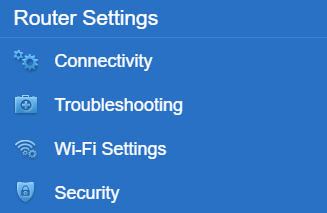
2. Under Router Settings, click Troubleshooting.
2. Under Router Settings, click Troubleshooting.

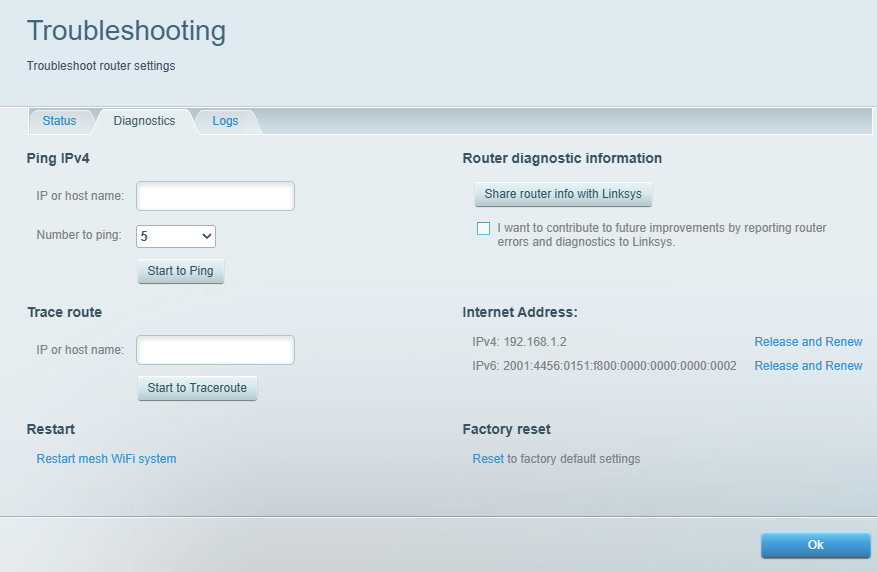
3. Under Troubleshooting, go to the Diagnostics tab.
4. Click the Reset link under Factory reset. This will reset your router to factory default settings.
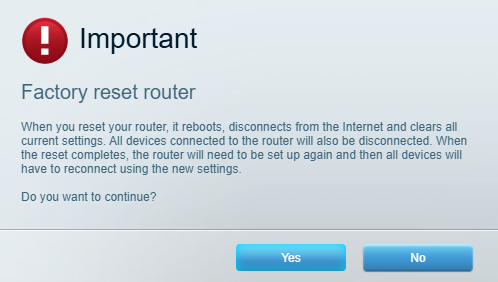
5. Click Yes to reset the router.
You have now successfully reset your Linksys mesh router.

