


Changing the Wi-Fi settings using the Linksys cloud account

Ensuring your router's basic Wi-Fi settings are modified is crucial for establishing a distinct and secure connection. A safeguarded Wi-Fi network helps prevent unauthorized access to personal information.
Before you begin:
- The changes you can make include assigning a Wi-Fi name and securing your connection through a Wi-Fi password.
- The Wi-Fi password is NOT the router password. Here are instructions to update the router password using your Linksys cloud account.
- Changing your Wi-Fi settings will disconnect all devices from your router. You have to reconnect them using the new settings. Here are instructions to connect your wireless computers to your WiFi.
- Images of the web-based setup page may differ depending on your router's model number.
The following steps will assist you in modifying the Wi-Fi settings of your router. Here is a video tutorial to learn more.
If you haven’t set up a Linksys cloud account, learn how to create, activate, and associate your account with your router.
2. Click Wi-Fi Settings on the left navigation pane under Router Settings.

3. Under the Basic tab, click Edit beside Wi-Fi Settings.


QUICK TIPS:
- Explore the difference between the 5 GHz and 2.4 GHz bands.
- On some Linksys Smart Wi-Fi Routers, the Wi-Fi name is also known as the Network name (SSID). A Wi-Fi password is also known as a Password. Setting your Network mode, Security mode, Channel width and Channel can also be done.
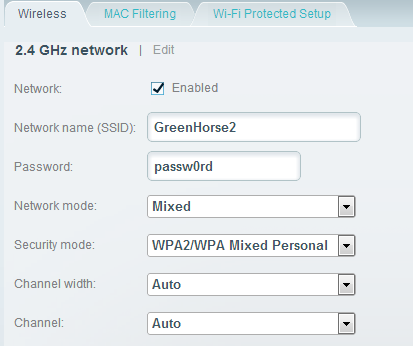
- Changing the WiFi channel lessens the interference to your Wi-Fi connection. Also, the available wireless channels may vary depending on your region.
5. Click Apply > Ok to save the changes.
Find out more:
How to automatically update the firmware of the Linksys Smart Wi-Fi Routers
How to check and update the router password using your Linksys cloud account
How to turn OFF my router’s or gateway’s Wi-Fi
1584

