


Customizing the different WiFi bands of your Linksys router

You can change the WiFi settings of your Linksys router to establish a unique and secure WiFi using the browser-based LinksysSmartWiFi.com page. Follow the steps below to learn how to do it.
- It is recommended to change the router's WiFi settings through the web interface.
- The troubleshooting steps in this article are only applicable to LinksysSmartWiFi.com. The Linksys app does not support this configuration.
- You can access the router's dashboard through the Linksys app if you want to check your WiFi settings or other router configurations.
Directions
1. Log in to the router's web browser. To learn how, click here . If you have a Linksys Mesh Router, click here.
2. Under Router Settings, click Wi-Fi Settings.
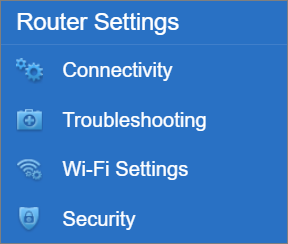
3. You can use the same WiFi settings for all bands or use different settings for each band.
Option 1. Same Wi-Fi settings
Under Wi-Fi Settings in the Wireless tab, enter your preferred WiFi name and WiFi password. Then, select your Security mode and Wi-Fi mode.
Option 2. Separate settings
Under Wi-Fi Settings in the Wireless tab, click Show more.
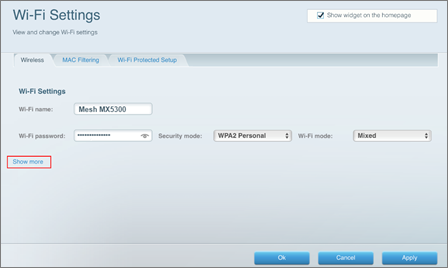
Enter and select your preferred settings for each band.
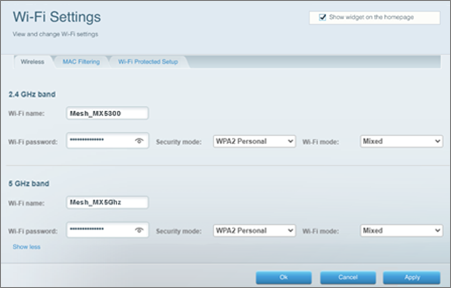
4. Once you are satisfied with your settings, click the Apply button.
5. When the Using different Wi-Fi names pop-up window appears, click Use different names.
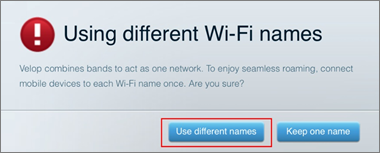
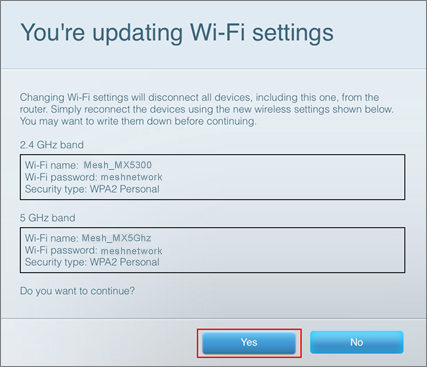
6. When the You're updating Wi-Fi settings pop-up window appears, click Yes.
7. Click Ok.
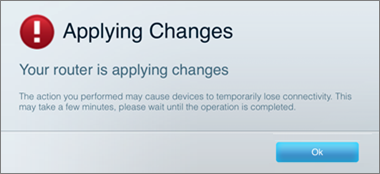
Your Linksys router will restart. All wireless devices will be temporarily disconnected from the internet. When your router is ready, you can reconnect your devices with the new WiFi settings.
2500

