


Restarting your router using the Linksys app

A reset restores your router to the state it was when you took it out of its box, requiring you to go through the setup process again. A restart, on the other hand, is far less disruptive than a factory reset because all settings are maintained. WiFi devices will disconnect from the router but will reconnect automatically once the router is ready and the devices find the network.
The most common method to restore communication for a modem or router is to restart it by turning it OFF, then back ON again. This gives the devices a chance to find each other.
This article will teach you how to restart your router using the Linksys app.
Steps and images may vary depending on the operating system of your mobile device, the version of your Linksys app, or the model of your router.
The most common method to restore communication for a modem or router is to restart it by turning it OFF, then back ON again. This gives the devices a chance to find each other.
This article will teach you how to restart your router using the Linksys app.
Steps and images may vary depending on the operating system of your mobile device, the version of your Linksys app, or the model of your router.
1. Connect your mobile device to your router's WiFi, then open the Linksys app.
2. Log in using Router Password on iOS or Use Router Password on Android™.
If you forgot your router's admin password, tap on Reset password and follow the on-screen instructions.
| iOS | Android |
 |
 |
3. On the dashboard, tap the menu  icon in the upper-left corner.
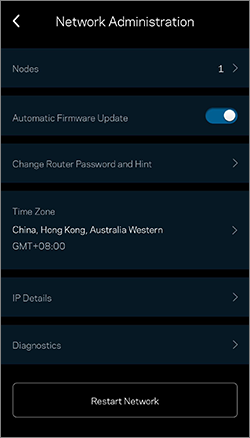
4. Tap Network Administration.
| iOS | Android |
 |
 |
5. Tap Restart Network.
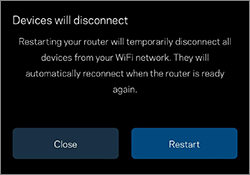
6. Tap Restart. While the router is restarting, all connected devices will lose their internet connection and will automatically reconnect when the router is ready.
6. Tap Restart. While the router is restarting, all connected devices will lose their internet connection and will automatically reconnect when the router is ready.
Once the process is completed, a message will be displayed that you have successfully restarted your router.

