


링크시스 듀얼 밴드 와이파이 라우터에서 단일 포트 포워딩을 구성하는 방법

Single Port Forwarding allows you to set up public services on your network such as web servers, File Transfer Protocol (FTP) servers, email servers or other specialized internet applications such as videoconferencing or online gaming. Follow the instructions below to learn how.
Basic Requirements
Basic Requirements
- Note the port you need to forward – Service ports have different assigned numbers depending on the type of service, hardware or application. Refer to your documentation or contact your device manufacturer for details.
- Set a Static IP address on the device – You will need to assign a Static IP address to the computer or device you are configuring for port forwarding. This way, the port forwarding request will be sent to and received from the same IP address.
1. Log in to the Linksys Dual-Band WiFi Router's web interface.
2. Click the Configuration tab.
3. Click Security.
4. Click Single Port Forwarding.
2. Click the Configuration tab.
3. Click Security.
4. Click Single Port Forwarding.
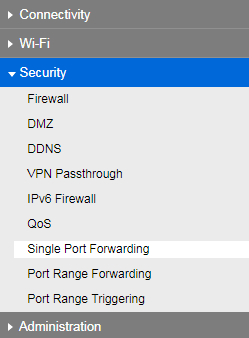
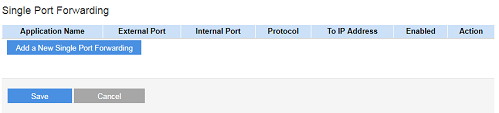
5. In the Single Port Forwarding page, click the Add a New Single Port Forwarding button.
6. Enter the details of the device you want to forward. Make sure to identify the Application and enter the Application Name, External and Internal Ports. Also, you need to identify the Protocol to be used and the IP Address (the static IP address of your device) correctly. Once done, check the Enabled box.
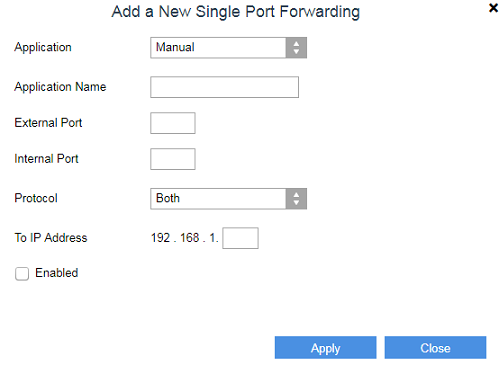
7. Click Apply.
You now have successfully configured the Single Port Forwarding on your router.
3555

