


링크시스 듀얼 밴드 와이파이 라우터에서 무선 MAC 필터링을 구성하는 방법
Wireless MAC Filter allows you to filter the devices that are connected to the router through their MAC addresses. This feature either prevents or permits wireless clients with MAC addresses listed in the router to access the network. To learn how to do this on your Linksys Dual-Band WiFi Router, follow the instructions below.
Images vary by the model of your router.
Images vary by the model of your router.
1. Log in to the Linksys Dual-Band WiFi Router web interface.
2. Click the Configuration tab.
3. Click Wi-Fi.
4. Click Wireless MAC Filter.
2. Click the Configuration tab.
3. Click Wi-Fi.
4. Click Wireless MAC Filter.

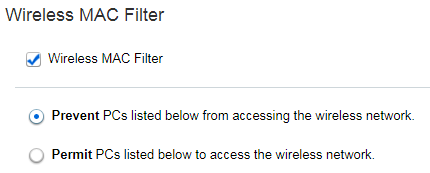
5. Check the box before Wireless MAC Filter to enable the feature. Then, select the desired MAC filtering setup option. You can select either:
- Prevent PCs listed below from accessing the wireless network. - The wireless devices on the MAC Address Filter List will not have access to the WiFi.
- Permit PCs listed below to access the wireless network. - Only wireless devices on the MAC Address Filter List will have access to the WiFI.
In this example, the MAC address that you will enter in the list will be prevented from accessing the WiFi. If you ticked the button that will permit wireless clients to access the WiFi, only the MAC addresses entered in the list can do so.
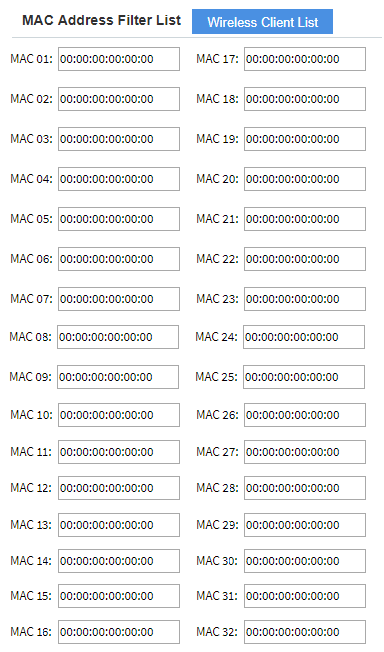
6. Click on the Wireless Client List to view and select clients.
In the MAC Address Filter List, you can manually enter up to 32 MAC addresses of wireless devices you want to prevent or allow access to your WiFi.
The Wireless Client List displays necessary information on the devices connected to your network, such as Client Name, Interface, IP Address, MAC Address, Status and the option to Save to MAC Address Filter List.
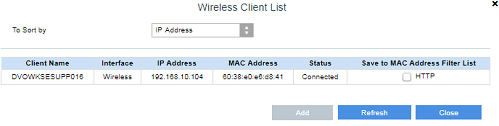
7. Choose the device you want to either permit or prevent access to your network by checking the box before HTTP.
8. Click Add.
9. Once done, click Close. The MAC address of that device will now appear in the MAC Address Filter List.
10. Click Save to apply settings.
You now have successfully configured the Wireless MAC filter feature of your router.
3588

