


Turning ON/OFF the EasyMesh feature on the Linksys Dual-Band WiFi Router
The Linksys Dual-Band WiFi Router delivers enhanced speed, range, and security for all your networking needs which allows you to swiftly stream HD videos, surf, email, play games online, and chat.
This article will show you how to enable EasyMesh if you plan on adding Linksys EasyMesh child nodes to extend your WiFi network.
If you do not have any Linksys EasyMesh child nodes extending your WiFi network, you can turn OFF the feature.
Before you begin, it is important to know the following:
- Currently, the Linksys E7350, Linksys E8450, and Linksys E5600 support EasyMesh with the latest firmware.
- Make sure your router has the latest firmware installed which supports the EasyMesh feature.
- Linksys Mesh routers and Velop products are not compatible with EasyMesh.
- Turning OFF the EasyMesh feature will disconnect all child nodes that are connected to the parent node. Also, you will no longer be able to add child nodes to the parent node until you turn the feature back ON.
1. Access the router's web interface.
2. Go to the Configuration tab.
3. On the left side of the screen, click on Wi-Fi > Basic Wireless Settings.
2. Go to the Configuration tab.
3. On the left side of the screen, click on Wi-Fi > Basic Wireless Settings.
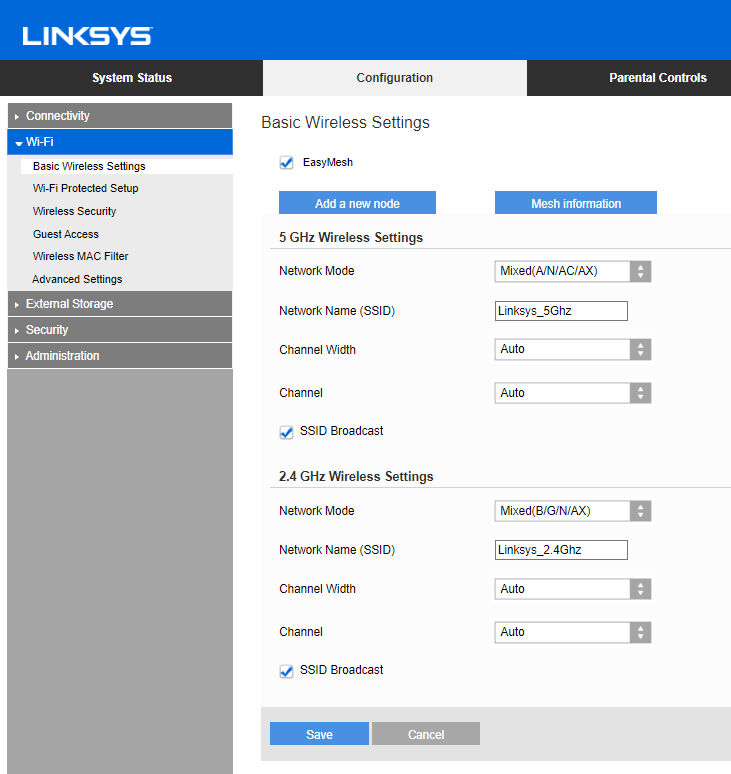
4. Click on the EasyMesh Parent Node checkbox to enable it then click Save.
NOTE: If you don’t have this option, you need to install the latest firmware update. You may uncheck the box to disable the EasyMesh feature if you don’t have any EasyMesh child nodes in your network.
3918

