


Checking if the Linksys range extender is properly set up

Having a properly set up range extender ensures greater WiFi speed, coverage and signal strength. To check if your Linksys RE7000, RE7310 or RE7350 is properly set up, follow the steps below.
1. Access your range extender’s web-based setup page. For instructions, click here.
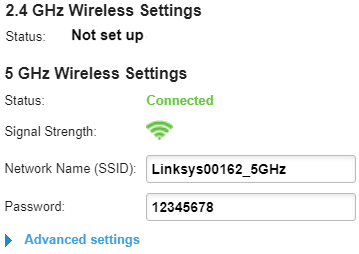
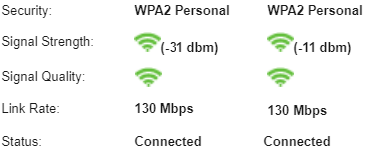
2. On the Basic Settings page, check the status of your network. The Status should show Connected. In the example below, only one network is properly set up.
2. On the Basic Settings page, check the status of your network. The Status should show Connected. In the example below, only one network is properly set up.
You may also go to Status > WLAN Statistics to check the status of your connection.
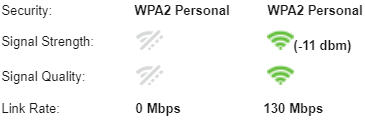
In the Signal Strength, the status of the 2.4 GHz and 5 GHz uplinks that connect the Linksys range extender and the upstream access point or router is shown. In the example below, only one network is showing a connection to your uplink.
In the Signal Strength, the status of the 2.4 GHz and 5 GHz uplinks that connect the Linksys range extender and the upstream access point or router is shown. In the example below, only one network is showing a connection to your uplink.
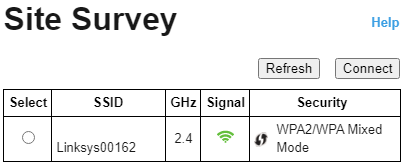
3. To fix this, go to Wireless > Site Survey.
4. Then, click on the radio button that corresponds to your SSID. Click on Connect.
5. Enter the WiFi password in the Passphrase field. Then, click on Connect.
Wait for a moment while your settings are being saved.
Wait for a moment while your settings are being saved.
Once the Status for all your bands on the Basic Settings page show Connected, your range extender is now properly set up.
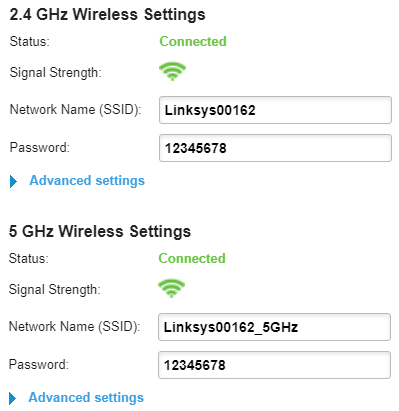
On the WLAN Statistics page, the Signal Strength will display the connection and the Status will be Connected.
4678

