


Linksys E9450 よくある質問
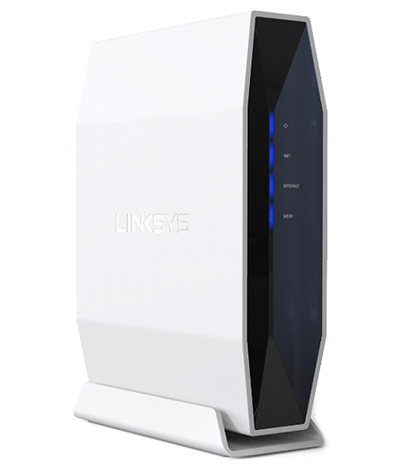
Linksys E9450 WiFi 6 ルーターは、802.11ax 規格に対応した EasyMesh™ デュアルバンドルーターで、最大 5.4 Gbps の高速通信を実現します。
本記事は、Linksys E9450-AH、E9450-CN、E9450-JP、E9450-KR を対象としています
Singtel の ISP によって提供された Linksys E9450、または北米で購入した Linksys E9450 をお持ちの場合は、以下のリンクをクリックしてください:
EasyMesh とは何ですか?
EasyMesh は、互換性のある EasyMesh 対応デバイスを使用して、ワイヤレスでネットワークを拡張できるメッシュシステムを構築するための技術です。例えば、Linksys E9450-AH、E9450-CN、E9450-JP、E9450-KR などの別の対応機器を追加することで、ネットワークの範囲を拡大できます。 なお、Linksys E9450 の米国モデルは EasyMesh 機能をサポートしていません。
Linksys Intelligent Mesh™ ノードや Linksys E9450(米国モデル)を子ノードとして追加して、WiFi を拡張できますか?
いいえ。Linksys Intelligent Mesh ノードと Linksys E9450 の米国モデルには互換性がありません。また、Linksys E9450 の米国モデルは EasyMesh をサポートしていないため、子ノードとして使用することはできません。
WiFi ネットワークを拡張するために、他にどの EasyMesh 製品を追加できますか?
追加できるのは、もう 1 台の Linksys E9450 のみです。ただし、Linksys E9450(米国モデル)は EasyMesh をサポートしていないため使用できません。
ルーターにはアンテナがいくつありますか?
内部アンテナが 4 本あります。
ルーターの保証期間はどれくらいですか?
保証期間は 3 年です。
ルーターのランプは何を示していますか?
ルーターの USB ポートに USB ドライブを接続できますか?
はい。このルーターには、外付け USB ドライブを接続できる USB 3.0 ポートがあります。USB ポートは最大 900 mA に対応しています。外部電源付きの外付けドライブには対応していません。
サポートされているファイル形式は何ですか?
USB ストレージ機能は FAT32、NTFS、HFS+ に対応しています。
北米で購入した Linksys E9450 は、Linksys E9450-AH、E9450-JP、E9450-KR、または E9450-CN と互換性がありますか?
いいえ。北米版の Linksys E9450 は EasyMesh をサポートしておらず、ファームウェアも互換性がありません。
Linksys E9450 を設定するにはどうすればよいですか?
ルーターのデフォルトの IP アドレス、ユーザー名、パスワードは何ですか?
このルーターのデフォルト IP アドレスは 192.168.79.1 です。また、ユーザー名とパスワードはどちらも admin がデフォルトです。
ルーターは Starlink と互換性がありますか?
はい、互換性があります。ただし、Linksys ルーターを Starlink と一緒に使用するには Starlink イーサネットアダプターが必要です。これは Starlink のオンラインショップで購入できます。イーサネットケーブルの片方を Starlink イーサネットアダプターに接続します。ケーブルのもう片方を Linksys ルーターの Internet ポートに接続します。 Starlink と Linksys ルーターのセットアップ方法について詳細はこちら。
ルーターを工場出荷時の設定にリセットするにはどうすればよいですか?
ルーター背面にあるリセットボタンを 10 秒間押し続けてから放します。すると、ルーター前面の電源ランプが 一度消灯し、その後青色で点滅し始めます。
WiFi でインターネットに接続できず、利用可能なネットワーク一覧に自分の WiFi 名が表示されない場合はどうすればよいですか?
以下の手順を試してみてください:
- ルーターの電源ランプと WiFi ランプがどちらも青色点灯(solid blue)していることを確認します。
- WiFi の電波範囲の問題かどうかを確認するため、ノートパソコンまたはモバイル端末をルーターの近くへ移動してみてください。
WiFi が遅い、不安定、電波が弱い、または接続が維持できない場合はどうすればよいですか?
電波劣化を防ぐため、次の対策を行ってください:
- ルーターとデバイスの間の障害物(壁、家具、金属製の家電など)を取り除きます。
- ベビーモニター、電子レンジなど、同じ周波数帯を使用して干渉を起こす機器の近くにはルーターを置かないでください。
- ルーターを床から約 6 フィート(約 1.8 m)以上の高い場所に設置します。
- WiFi signal. WiFi の電波範囲を拡張するため、もう 1 台の Linksys E9450 を子ノードとして追加します。
インターネットランプがオレンジ色に点灯したままオンラインに接続できない場合はどうすればよいですか?
モデムとルーターを再起動し、数分間お待ちください。それでもオンラインに接続できない場合は、コンピューターをモデムに直接接続して接続を確認するか、インターネットサービスプロバイダー(ISP)に連絡してモデムに接続問題がないか確認してください。
ルーターがISPの5Gルーターと連携しません。どうすればいいですか?
ルーターをISPの5Gルーターと連携させるには、ISPが親ノードに接続するためのイーサネットポートを備えた互換性のある5Gルーターを提供している必要があります。
Linksys E9450 はどの VPN パススルーに対応していますか?
IPSec、PPTP、L2TP のパススルーに対応しています。
ルーターは SPI ファイアウォールをサポートしていますか?
はい。このルーターは SPI(Stateful Packet Inspection)ファイアウォールをサポートしています。
ペアレンタルコントロールはどのように設定できますか?
ルーターのファームウェアはどのようにアップグレードできますか?
このルーターには「自動ファームウェア更新(Auto Firmware Update)」機能が搭載されており、新しいファームウェアが利用可能になると自動的に更新されます。

