You are using an unsupported browser. Please update your browser to the latest version on or before July 31, 2020.
close
You are viewing the article in preview mode. It is not live at the moment.
Home > Advanced Configurations > WiFi Routers > Connecting your iPhone to the Guest WiFi
Connecting your iPhone to the Guest WiFi
print icon

Linksys routers let you create a separate Guest network, allowing visitors to connect to the WiFi without accessing your main network. Before connecting your iPhone®, make sure you have configured your router's Guest Access settings.
 

1. Navigate to Settings Settings icon .


2. Tap on Wi-Fi.


3. Tap the Guest network you want to connect to.
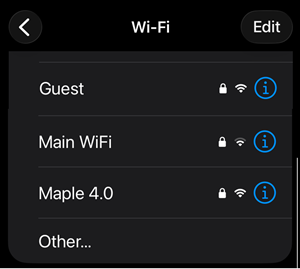
 

 Connect to the Guest WiFi


4. Enter your password and tap the check icon.
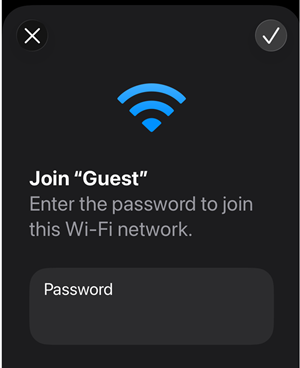
 

Enter the password to join this WiFi network


5. Look for the blue checkmark next to the Guest network name and the Wi-Fi icon in the top corner of your screen to confirm your connection.
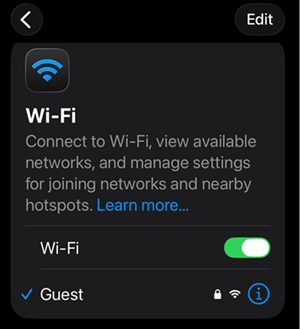
 

Look for the blue checkmark next to the Guest network and the Wi-Fi icon in the top corner 


Find out more:


Connecting your Android smartphone to the Guest WiFi
 

Was this support article helpful?
1 out of 6 found this helpful

Contact Us:
Call Us Access our list of global support numbers
Reddit Join and subscribe to our Official Reddit Community
Chat Us We are here to help you with all the questions you have

Linksys
Now
Support
scroll to top icon