


Downloading the latest driver or firmware from the Linksys Support site
It is advisable to update the driver or firmware of your Linksys device to fix device issues and to take advantage of enhancements that are not available in previous versions. This article will provide you with instructions on how to download the latest driver or firmware for your Linksys device.
Before you begin:
- If you can’t find firmware for your product, it may be an end-of-life (EOL) product, and firmware updates are no longer available. Learn more.
- For ethernet and wireless adapters, you need to download the driver. For devices such as routers, gateways, and network access storage, you need to download the firmware.
- The hardware version is located beside or beneath the model number and labeled version, ver., or V. If your Linksys product has no version number beside the model number, the device is version 1.
Images and the download process vary depending on your product.
1. Go to the Linksys Support site, enter your specific model number followed by the word Downloads (e.g., MR7350 Downloads or LN1100 Downloads) in the Enter Keywords or Model Number field, then search.

2. On the search results page, select the support article for your product. If you have an older model number, go to Step 3.

Select Downloads and Documents.
NOTE: The On This Page menu is hidden on mobile devices; scroll down the page until you find the Downloads and Documents section.

Then, select the Download link. Before downloading, check the physical product label on the underside or back of your device (e.g., V1, V2, V3)

For instructions on how to check the firmware version of your router, click the links below:
3. For some products with a downloads article, select the article on the search results page.

Choose your hardware version, then select Download.

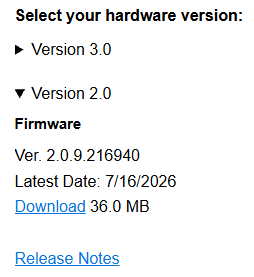
4. Save the file to your preferred location on your device. In most cases, it saves automatically to your Downloads folder. If the firmware is a .zip file, unzip it to extract the file.
For instructions on how to update the driver or firmware, click on the following links:

